
Strategy
Part of Planning a creator media kit as a claim register rather than a sales collage
Creator media kits planning template: a pre-send test log
A creator media kits planning template for England: record one recipient, one pack version, test observations, defects and retest evidence before sending.
Use this creator media kits planning template to record a pre-send test of one pack for one named recipient in England. It focuses on the test run: what version was checked, what should happen, what actually happened and what evidence supports the result.
Use it for a single chosen delivery route, rather than comparing tools or routes. A blank or untested result is not a pass. Copy the forms below into a working document and complete them as the test is performed.
Set up one test run
Start with a run record that makes the test identifiable later. Record the creator or account, pack name, exact version under test, intended recipient and the route being tested.
If a revised file or configuration is tested later, give that run its own identifier and link it to the earlier record; do not overwrite the first result.
Keep the test scope narrow. This log records whether the selected pack and route behaved as expected in the checks you performed. It does not establish that a buyer will accept the pack, that its claims are accurate, or that every required approval has been given.
Record those approvals in their appropriate records rather than treating a successful technical test as a substitute. Claims belong in the claim register described in the strategy and planning guide.
Before you begin, write down what the test is meant to establish and what falls outside it. For example, a check that a recipient can open a file does not assess whether the recipient likes its contents.
If the pack, route or intended recipient changes during testing, note the change and decide whether a new run is needed; do not silently apply an earlier result to a different setup.
PRE-SEND TEST RUN
Run reference: [blank]
Creator or account: [blank]
Pack name: [blank]
Pack version or fixture version: [blank]
Recipient name or organisation: [blank]
Recipient authority record or reference: [blank]
Chosen route under test: [blank]
Test operator: [blank]
Test environment or device: [blank]
Assistive technology used, if any: [blank]
Test date: [blank]
Purpose of this run: [blank]
Related earlier run, if any: [blank]
Keep the recipient and pack details consistent throughout the record. If the intended recipient changes, or the pack version is replaced, make a new run record so the evidence cannot be mistaken for a test of the new situation.
The authority field points to the record showing who may approve or receive the pack; this test log does not establish that authority. For related contracting-party or rights questions, use the commercial contracts record.
If the pack is used to advertise to consumers, GOV.UK says the rules on unfair commercial practices in the Digital Markets, Competition and Consumers Act mean you cannot mislead or harass them. Check that against the advertising rules, not in this log.
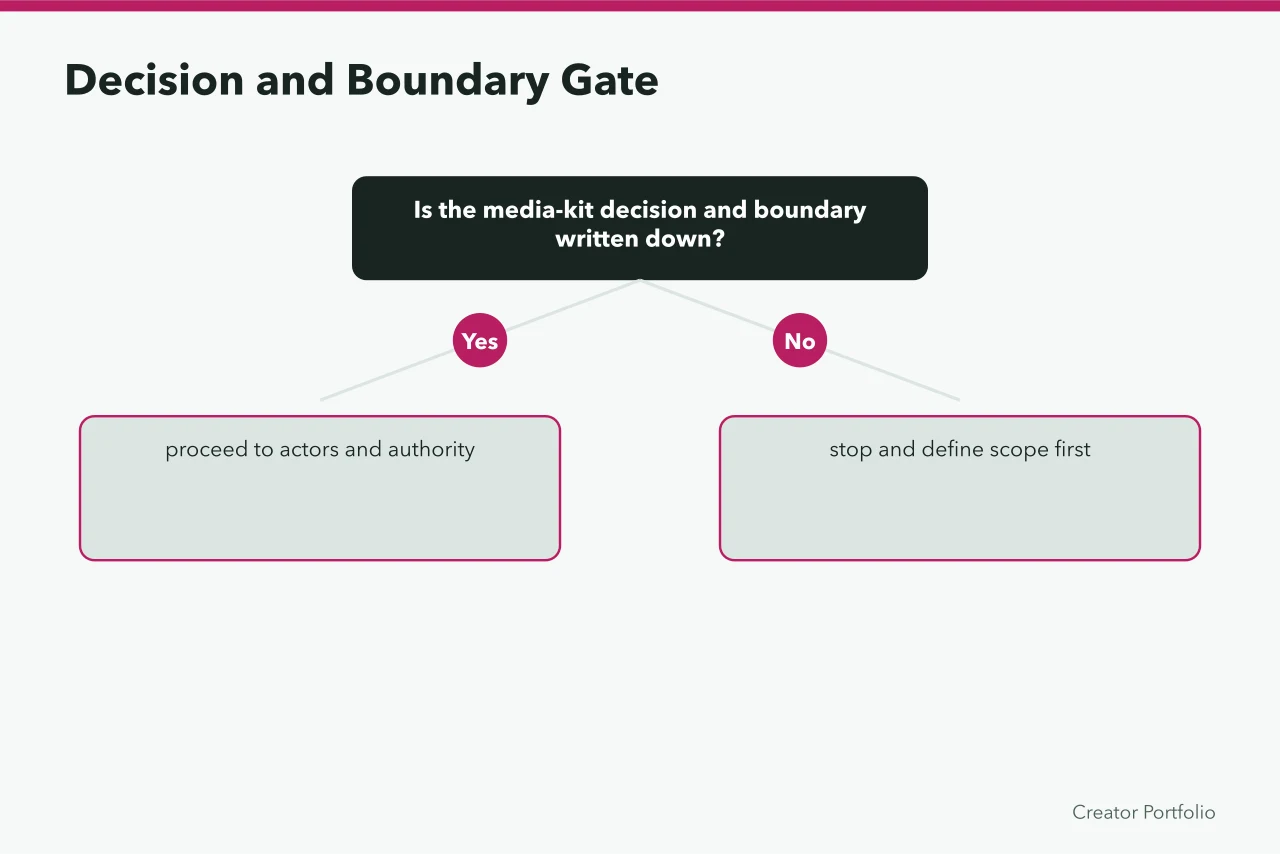
A simple sequence helps keep the record usable: identify the fixture and recipient; state the expected event; perform the check; record the observation and evidence reference; then assign a status.
If a check cannot be done, record why and leave it untested or on hold instead of filling the gap with an assumption. These are documentation steps, not a claim that every type of media kit needs the same tests.
Record the people and permissions relevant to the run
A test can involve more than the person who presses the button. Record who prepared the fixture, who operated the test, who can approve the pack, and who is expected to receive it.
Add a role and the evidence reference for each person or organisation; do not assume that being the operator means having approval authority.
Use the table to record only the roles relevant to this test. If a person is not involved, leave the row unused rather than inventing a role. Where an asset or test fixture requires permission, record the relevant reference and permitted use; the test result itself does not create permission.
| Person or organisation | Role in this run | Action permitted | Authority or permission evidence | Record reference |
|---|---|---|---|---|
| [blank] | [blank] | [blank] | [blank] | [blank] |
| [blank] | [blank] | [blank] | [blank] | [blank] |
| [blank] | [blank] | [blank] | [blank] | [blank] |
Authority Evidence Checklist
- Creator and authorised representative
- Receiving buyer and publisher
- Software or hosting operator
- Payment party and featured person
- Rights holder
- Permitted action and authority evidence
- Start, expiry and revocation route
If the identity or authority needed to conduct the run is unresolved, note that as a blocker instead of treating the test as authorised. Keep the underlying evidence with its owner, and link to it from the run record rather than copying material into a new document without a reason.
Use one row for each observed test
Write the expected event before running each check. Then record what happened, with a reference to the evidence: for example, a saved screenshot, a file name or a test note held with the project record.
Describe what was observed, not what you hoped would happen. If the event was not tested, mark it as untested and state why.
| Check or event | Expected result | Observed result | Evidence reference | Status |
|---|---|---|---|---|
| Correct pack version is presented | [blank] | [blank] | [blank] | [pass / fail / hold] |
| Intended recipient can access the pack | [blank] | [blank] | [blank] | [pass / fail / hold] |
| Pack opens and renders as intended | [blank] | [blank] | [blank] | [pass / fail / hold] |
| Links and media assets behave as intended | [blank] | [blank] | [blank] | [pass / fail / hold] |
| A planned correction or withdrawal is reflected | [blank] | [blank] | [blank] | [pass / fail / hold] |
| Required export or exit action is completed | [blank] | [blank] | [blank] | [pass / fail / hold] |
| Other event: [blank] | [blank] | [blank] | [blank] | [pass / fail / hold] |
The rows are prompts, not a claim that every event applies to every pack.
Use the actual chosen route and describe the expected behaviour in terms that can be observed. For a correction or withdrawal rehearsal, use fictional content and record what was changed, where the change was expected to appear and what you observed. A test that was not run cannot establish that the correction worked.
Make each expected result specific enough that another person can understand how you judged it. "Works correctly" is difficult to verify; "the named recipient can open the intended version and follow the selected link" gives the operator observable events to record.
If the outcome is partly successful, describe both the part that worked and the part that did not, then assign the status that reflects the unresolved issue.
For a rendering check, record the device and assistive-technology coverage in the run header and identify the part of the pack inspected. If a link or asset fails, preserve the failing result and the later retest evidence; do not replace the failed record with a clean screenshot that hides the sequence.
The GOV.UK Service Manual, written for government services, says a service must work on the most common browsers and devices and with common assistive technologies; use it as a coverage reference, not a requirement for a media kit. The delivery operations guide can be used alongside this log when documenting correction, export or exit work.
Record defects, corrections and retests
A defect record should identify the failed check, describe the mismatch and name the person responsible for the correction. Keep the original observation.
After a change, run the relevant check again against the corrected version and record the new result separately. This shows whether the correction addressed the observed issue without implying that unrelated checks were repeated.
DEFECT AND RETEST
Run reference: [blank]
Failed check or event: [blank]
Pack version tested: [blank]
Expected result: [blank]
Observed mismatch: [blank]
Evidence of mismatch: [blank]
Correction owner: [blank]
Correction made: [blank]
Corrected pack version: [blank]
Retest operator: [blank]
Retest event and expected result: [blank]
Retest observation: [blank]
Retest evidence reference: [blank]
Retest status: [pass / fail / hold]
Open issue or next action: [blank]
If the correction changes the pack version or the route, record that change explicitly. A retest of one failed event does not prove that every other event succeeded. If the cause or remedy is still uncertain, keep the relevant result on hold and state what evidence or action is outstanding.
Retain enough context to connect each retest to the original failure: the run reference, check name, version tested and evidence reference should be clear. Where several defects arise, give each a separate entry or otherwise make their individual status and follow-up distinguishable. Do not mark a correction complete merely because a change was made; record the retest observation that supports the result.
Close the run with an evidence-based status
Use pass only when the recorded observation matches the expected result and the evidence reference is available. Use fail when the observation differs from the expected result.
Use hold when the check has not been completed, evidence is missing, or a dependency prevents a decision. Give each status a short reason; a blank status or a blank evidence field is not a pass.
RUN OUTCOME
Run reference: [blank]
Pack version covered: [blank]
Recipient and route covered: [blank]
Checks passed: [blank]
Checks failed: [blank]
Checks on hold or not run: [blank]
Outstanding correction or evidence: [blank]
Decision for this run: [pass / fail / hold]
Decision recorded by: [blank]
Decision evidence or reference: [blank]
Next action: [blank]
This outcome describes only the run and version named in the record. It does not certify the content, permissions or approvals outside the checks actually performed, and it should not be carried forward automatically to another recipient or version.
If it is necessary to budget staff time for repeated testing or corrections, record the assumptions in the blank budget template, rather than adding unsupported estimates to the test log. Keep superseded run records so the reason for a later result remains traceable. The run belongs among the phases of the ninety day plan toward a checked kit.